
You’re paying too much for Mailchimp. And you’re not alone.
In 2026, thousands of businesses are actively searching for a Mailchimp alternatives not because email marketing is dying, but because Mailchimp has quietly become one of the most expensive and restrictive platforms in the space. Their free plan now caps you at just 250 contacts. Their key features sit behind expensive paywalls. And their interface has grown cluttered while better, cheaper options have emerged.
The good news? Switching is easier than you think and the savings are real.
| If you’re short on time, here’s the bottom line right now: 🏆 Best ROI: MailerLite the most user-friendly platform with the best features per dollar. 📋 Large Lists: Brevo store unlimited contacts and only pay for emails you actually send. ✍️ Content Creators: Kit (ConvertKit) built specifically for bloggers, influencers, and digital product sellers. |
But before you jump ship, there’s a right way and a wrong way to switch. Pick the wrong alternative and you’ll end up with a platform that doesn’t fit your workflow or worse, one that costs just as much.
That’s exactly what this guide solves. Below, we break down the top 5 Mailchimp alternatives in 2026 what each one does better, how the pricing stacks up, who each platform is actually built for, and how to migrate your entire list in minutes without losing a single subscriber.
Whether you have 500 contacts or 500,000 there’s a better, more affordable platform waiting for you. Let’s find yours.
Table of Contents
Why Look for a Mailchimp Alternatives Now?
For years, Mailchimp was the « gold standard » for email marketing. But as we move through 2026, the landscape has shifted. What used to be a simple, affordable tool for small businesses has evolved into a complex, multi-channel platform that might no longer fit your needs.
If you’re wondering why so many marketers are hunting for a Mailchimp alternatives, here are the three biggest reasons driving the switch right now.
The « Shrinking » Free Plan
The most common reason to look for a Mailchimp alternatives is the dramatic reduction in their free offering.
- The Reality in 2026: Mailchimp’s free plan now limits users to just 250 contacts and 500 monthly sends. To put that in perspective, a few years ago, you could have 2,000 contacts for free.
- Daily Caps: They’ve also introduced a daily send limit of 250 emails. If you have 251 people on your list, you literally cannot email them all at the same time without a paid plan.
- Missing Features: Crucial tools like email scheduling and multi-step automations have been removed from the free tier entirely.
Pricing That Punishes Growth
Mailchimp’s pricing model is « contact-based, » but with a catch that feels like a penalty as you scale.
- Double Charging: Mailchimp counts « unsubscribed » contacts toward your billing limit unless you manually archive or delete them. This means you are often paying for people you aren’t even allowed to email.
- The « Standard » Jump: Once you outgrow the « Essentials » plan to get advanced automations, your monthly bill can nearly double. For a growing business, these costs often balloon faster than the revenue the emails generate.
Complexity Overload
Since being acquired by Intuit, Mailchimp has moved toward being an « All-in-One Marketing Platform. »
- The Interface: The dashboard is now packed with features like social media scheduling, appointment booking, and AI ad builders.
- The Problem: If you just want to send a clean, professional newsletter, these extra tools create « interface bloat. » It makes the platform harder to navigate and slower to use compared to streamlined Mailchimp alternatives like MailerLite or Kit.
Detailed Comparison: The Top 5 Mailchimp Alternatives in 2026
Alternative 1: MailerLite – The Best All-Rounder
Key Selling Point: The perfect balance of simplicity and advanced features.
If you’re looking for a Mailchimp alternatives that doesn’t require a steep learning curve, MailerLite is the one to beat. It gives you a clean, intuitive experience without stripping out the features that actually matter.
The 2026 Edge
MailerLite’s drag-and-drop editor has seen significant improvements this year. Building beautiful, responsive emails now takes minutes not hours. The interface is uncluttered, the logic is straightforward, and everything from landing pages to pop-ups is built into the same dashboard. No jumping between tools.
Pricing vs Mailchimp
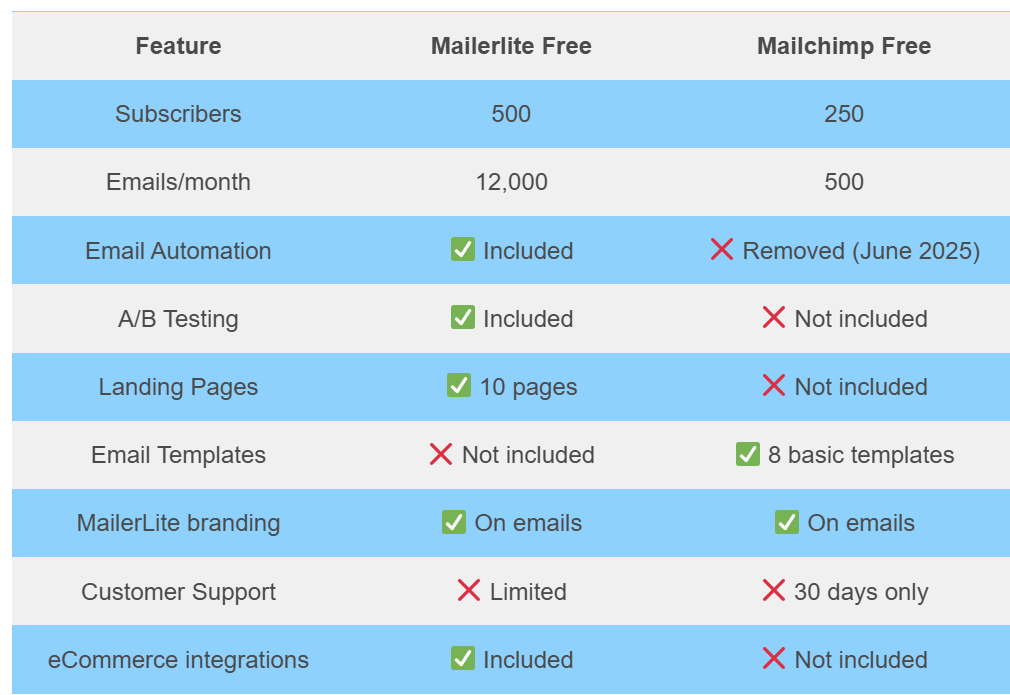
This is where MailerLite really pulls ahead. Their free forever plan includes up to 1,000 subscribers and 12,000 emails per month with automation included. Mailchimp’s free plan, by contrast, has stripped back automation and now limits you in ways that make it barely functional for serious use. MailerLite’s paid plans start at a fraction of what Mailchimp charges for equivalent contact tiers.
Best for: Bloggers, small business owners, and digital marketers who want professional results without the complexity or the price tag.
Alternative 2: Brevo (Formerly Sendinblue) – Best for Scale
Key Selling Point: You pay for emails sent, not the size of your list.
This single difference makes Brevo one of the most disruptive Mailchimp alternatives available in 2026. With Mailchimp, your bill grows every time you add a contact. With Brevo, you can store unlimited contacts for free you only pay based on your monthly sending volume. For businesses sitting on large lists but sending campaigns selectively, this model is a game-changer.
The 2026 Edge
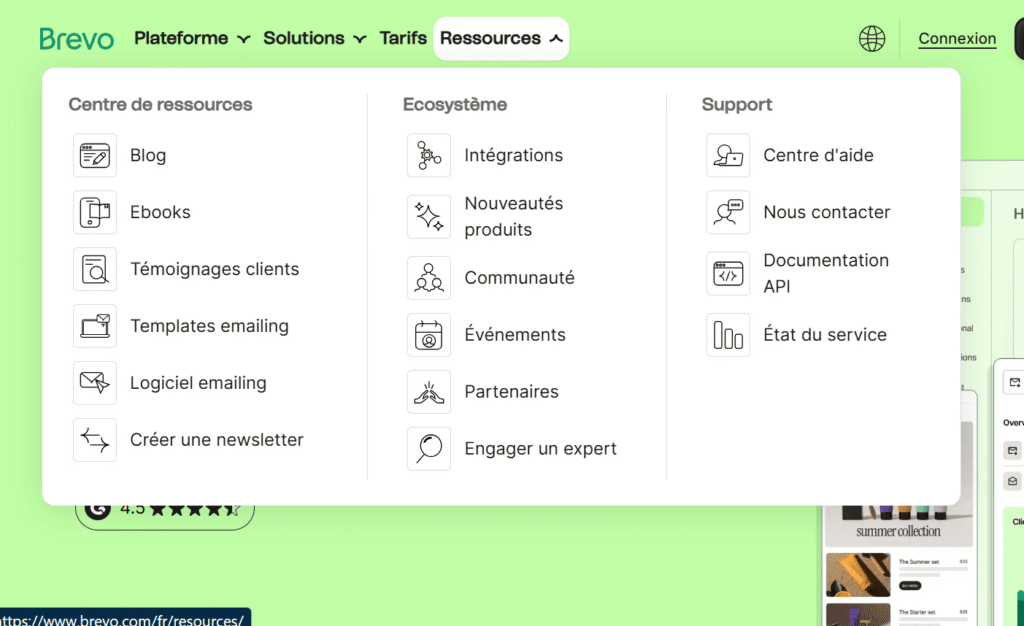
Brevo isn’t just an email tool. Its built-in CRM lets you manage contacts, track deals, and log interactions without needing a separate platform. Add SMS marketing on top of that fully integrated, no third-party app required and you have a multi-channel marketing hub that Mailchimp simply can’t match at the same price point.
Best for: Businesses with large contact lists who send fewer monthly emails, and teams that want email, SMS, and CRM under one roof without paying for three separate tools.
Alternative 3: ConvertKit (Kit) – Best for Creators
Key Selling Point: Built from the ground up for people who create content for a living.
Most email platforms are designed for e-commerce or corporate marketing teams. ConvertKit now officially rebranded as Kit was built with a completely different user in mind: the individual creator. Authors, YouTubers, podcasters, and course sellers will feel at home immediately.
The 2026 Edge
Kit’s tagging and segmentation system is one of the most powerful in the industry. Instead of managing multiple lists, you tag subscribers based on their behavior, interests, or what they’ve purchased then send hyper-targeted sequences accordingly. The standout feature in 2026, however, is the Creator Network: a built-in recommendation system that lets you grow your audience by partnering with other creators on the platform. It’s a growth tool no other Mailchimp alternatives on this list offers.
Best for: Influencers, bloggers, authors, course creators, and anyone selling digital products who wants their email platform to actively help them grow.
Alternative 4: Moosend – The Budget King
Key Selling Point: Pro-level email marketing at a price that won’t strain a tight budget.
If cost is your primary concern, Moosend is the most compelling Mailchimp alternatives on this list. Paid plans start at around $9/month and that’s not a stripped-down starter plan. You get full access to automation workflows, landing pages, segmentation, and real-time analytics right out of the gate.
The 2026 Edge
What makes Moosend stand out in 2026 is how much automation power it packs into its base plan. You can build complex, multi-step workflows triggered by user behavior the kind of automation Mailchimp reserves for its much pricier tiers. For startups and solopreneurs who need to punch above their weight, Moosend delivers a disproportionate amount of value per dollar spent.
Best for: Startups, solopreneurs, and budget-conscious marketers who refuse to sacrifice functionality for affordability.
Alternative 5: GetResponse – The Webinar & Sales Funnel Pro
Key Selling Point: The only true all-in-one platform that includes webinar hosting and built-in sales funnels.
Most email marketing tools do email. GetResponse does email, webinars, landing pages, sales funnels, paid ads, and live chat all from a single platform. If you’re running a business that relies on multiple touchpoints to convert leads, this Mailchimp alternatives eliminates the need for a patchwork of separate tools.
The 2026 Edge
GetResponse’s conversion funnel builder lets you map out the entire customer journey from the first opt-in to the final purchase without leaving the platform. The integrated webinar tool supports live sessions, on-demand replays, and automated webinar sequences, making it particularly powerful for high-ticket service providers and online educators. No Zoom integration required. No separate webinar platform to pay for.
Best for: E-commerce brands, online coaches, consultants, and high-ticket service providers who want a single platform to manage their entire marketing and sales process.
Head-to-Head: MailerLite vs Mailchimp in 2026
When people start hunting for a Mailchimp alternatives, MailerLite is almost always the first name that comes up. And for good reason. To help you decide if the switch is worth it, here’s a direct, no-fluff comparison across the four areas that matter most.
Ease of Use: The Learning Curve
MailerLite wins this one clearly.
From the moment you sign up, MailerLite feels purpose-built for people who want to get things done fast. The dashboard is clean, the navigation is logical, and creating your first campaign takes minutes. Every feature is where you’d expect it to be.
Mailchimp, by contrast, has grown into a cluttered platform. Years of adding new features CRM tools, social posting, website builders have made the interface busier and harder to navigate, especially for new users. What should be a simple task, like setting up a welcome email sequence, often involves more steps and more clicking than it needs to.
Verdict: MailerLite is the better choice for anyone who values a smooth, intuitive experience especially beginners and time-poor business owners.
Deliverability Rates: Who Actually Gets Into the Inbox?
Deliverability is the metric most people overlook and it’s arguably the most important one. A beautifully designed email means nothing if it lands in the spam folder.
Both platforms perform well, but MailerLite has a slight edge in 2026.
Independent testing consistently places MailerLite’s deliverability rates above the industry average, typically landing between 94–97%. Mailchimp performs respectably too, but has faced criticism in recent years for inconsistent deliverability, particularly for users on shared IP addresses in the lower-tier plans.
MailerLite also makes it easier for users to authenticate their domain (SPF, DKIM setup) a technical step that directly improves inbox placement. The guided setup process removes the friction that trips up non-technical users on other platforms.
Verdict: If getting your emails seen is the priority and it should be MailerLite’s deliverability track record gives it a meaningful advantage.
Automation: The Visual Builders
Marketing automation is where the gap between these two platforms becomes very apparent especially when you factor in pricing.
MailerLite’s automation builder is cleaner, faster, and available on free and lower-tier plans.
You get a visual drag-and-drop workflow editor where you can build multi-step sequences based on triggers like sign-ups, link clicks, purchases, or time delays. The logic is easy to follow, and building a complete onboarding sequence takes under 30 minutes even if you’ve never done it before.
Mailchimp does offer a visual automation builder, but here’s the catch: the most useful automation features like branching logic and behavioral triggers are locked behind its Standard and Premium plans, which start at a significantly higher price point. On the free and Essentials plans, automation is limited to basic single-step emails.
Verdict: For automation depth at an accessible price, MailerLite is the stronger Mailchimp alternatives. You get more capability for less money, and you don’t have to upgrade just to unlock the essentials.
Customer Support: 24/7 Chat vs. Email-Only
This is one of the starkest differences between the two platforms and it matters more than people realize until something goes wrong mid-campaign.
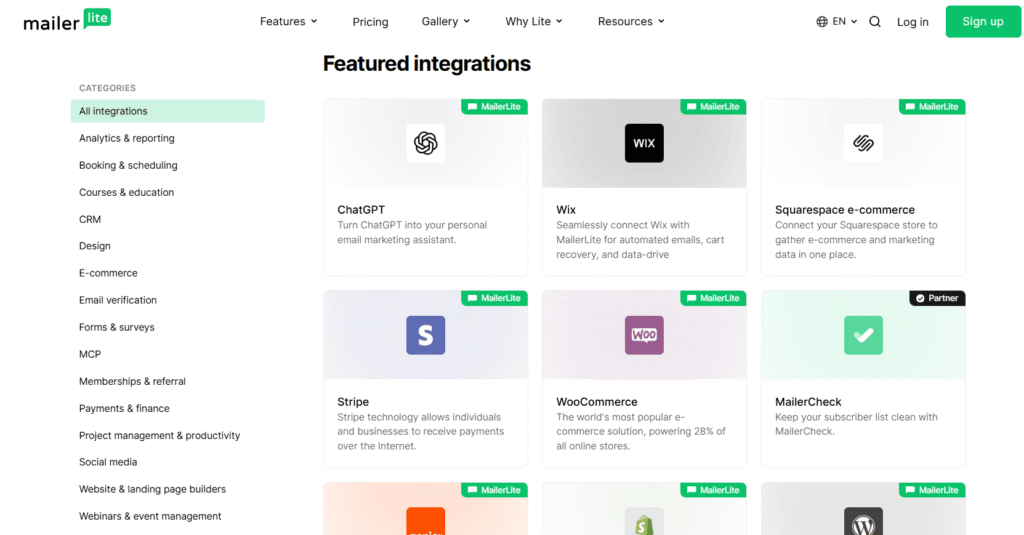
MailerLite offers 24/7 live chat support on all paid plans, and even free plan users get access to email support. Response times are consistently fast, and the support team is known for being genuinely helpful rather than bouncing you between FAQ links.
Mailchimp’s support structure is far more restrictive. Free plan users get no live support at all only access to the help documentation. Email support is available on the Essentials plan, and live chat is only unlocked on the Standard plan and above. If you’re on a budget plan and hit a technical problem before a scheduled send, you’re largely on your own.
Verdict: For any business that relies on timely, reliable help, MailerLite’s support model is significantly more user-friendly and more honest about what customers deserve regardless of their plan size.
📸 [Image suggestion: A comparison graphic or icon-based table showing support availability across plan tiers for both platforms — clearly marking where live chat, email support, and self-service only apply. A « traffic light » style visual (green/yellow/red) works extremely well here.]
The Overall Verdict
Across all four categories, MailerLite consistently matches or outperforms Mailchimp often at a lower price point. Here’s the quick summary:
| MailerLite | Mailchimp | |
|---|---|---|
| Ease of Use | ✅ Cleaner, faster | ❌ Cluttered interface |
| Deliverability | ✅ 94–97%, consistent | ⚠️ Good, but inconsistent |
| Automation | ✅ Full features on lower plans | ❌ Key features paywalled |
| Customer Support | ✅ 24/7 chat on paid plans | ❌ Limited on lower tiers |
📸 [Image suggestion: A styled version of the table above as a designed graphic rather than plain text — with brand colors, checkmarks, and clear visual hierarchy. This makes it highly shareable on social media and Pinterest, which can drive additional traffic to the article.]
How to Migrate from Mailchimp Without Losing Data
Moving your email list can feel like moving houses you want to make sure nothing gets broken or left behind in the process. When switching to a Mailchimp alternatives, the goal is a « seamless migration » where your tags, segments, and clean list remain intact.
Here is the step-by-step guide to migrating without losing a single subscriber.
Step 1: Clean Your List Before the Move
Don’t pay to move « dead weight. » Before exporting, go to your Mailchimp Audience and filter for « Cleaned » or « Unsubscribed » contacts.
- The Pro Move: Only export your « Subscribed » members for your active marketing. However, you should also export your « Unsubscribed » list separately to upload as a suppression list in your new tool. This ensures you never accidentally email someone who already opted out.
2. Export Your Data (The CSV Method)
Most Mailchimp alternatives allow you to import via a CSV file.
- In Mailchimp, go to Audience > All Contacts.
- Click Export Audience.
- Once the export is ready, download the ZIP file and open the CSV.
- Check your columns: Ensure your « Tags » and « Custom Fields » (like birthdays or city) are in their own columns so they can be mapped correctly in the new platform.
3. Use a Direct Integration (The Fast Way)
Many modern platforms like MailerLite or ConvertKit have a « one-click » import tool.
- You simply provide your Mailchimp API key, and the new tool « grabs » your subscribers, tags, and groups automatically.
- Warning: Even with direct integration, always double-check that your Tags were converted into the new tool’s equivalent (often called « Groups » or « Segments »).
4. Rebuild Your Automations Manually
This is the only part that cannot be « exported. » Email platforms use different coding for their automation builders.
- The Strategy: Before closing your Mailchimp account, take screenshots of your « Customer Journeys. » Note the triggers (e.g., « Signed up for Newsletter ») and the time delays (e.g., « Wait 2 days »).
- Use these screenshots as a blueprint to rebuild the logic in your new Mailchimp alternatives.
5. Update Your Signup Forms
Once your data is moved, you must « cut the cord. »
- Replace the Mailchimp embed codes on your website with the new forms from your chosen provider.
- Don’t forget to update links in your social media bios or « link-in-bio » pages.
Final Verdict: Which One Should You Choose?
Choosing a Mailchimp alternatives in 2026 isn’t just about finding a cheaper tool it’s about finding the right « ecosystem » for your specific business model. After reviewing the top contenders, here is the final breakdown to help you make the right choice.
The Verdict: Match the Tool to Your Goal
1. The Best All-Rounder: MailerLite
You want the best all-around Mailchimp alternatives without overpaying or overcomplicating things. MailerLite hits the sweet spot between ease of use, feature depth, deliverability, and price. It’s the closest thing to a straight upgrade from Mailchimp for the majority of users especially bloggers, freelancers, and small business owners who want professional results without a steep learning curve or a bloated bill.
- Pick this if: You want a generous free plan (up to 500-1,000 subscribers) and affordable scaling as your list grows.
2. The Best for Large Lists: Brevo
Your contact list is large but you don’t email them every week. Brevo’s contact-based pricing model means you’re not penalized for list growth you only pay for what you send. Add in the built-in CRM and SMS capabilities, and it becomes the smartest Mailchimp alternatives for scaling businesses that need more than just email.
- Pick this if: You have 50,000+ contacts and want to store them all for free while only paying for the specific campaigns you send.
3. The Best for Creators & Bloggers: Kit (formerly ConvertKit)
If your business is built around your personal brand, courses, or newsletters, Kit is designed for you. Its « Creator Network » helps you grow by partnering with other creators a feature Mailchimp simply doesn’t have.
- Pick this if: You prioritize list-building, tagging subscribers by interest, and selling digital products.
4. The Best for E-commerce: Klaviyo or Omnisend
If you run a Shopify or WooCommerce store, a general Mailchimp alternatives won’t cut it. You need deep data integration.
- Pick this if: You want to send automated emails based on exactly what a customer bought, what they looked at, or how much they’ve spent in your store.
5. The Best for Tight Budgets: Moosend
If you need pro-level automations (like abandoned cart or weather-based triggers) but can’t afford enterprise prices, Moosend remains one of the most affordable paid options on the market.
- Pick this if: You’ve outgrown free plans but aren’t ready to spend $50+/month on marketing.
Final Summary Table
| If you are a… | Use this Mailchimp Alternatives | Top Reason |
| Beginner / SMB | MailerLite | Simplest interface + Best ROI |
| High Volume Sender | Brevo | Unlimited contacts storage |
| Content Creator | Kit | Built-in growth network |
| Online Store Owner | Klaviyo | Advanced Shopify/e-commerce data |
| Budget Hunter | Moosend | Cheapest paid « Pro » features |
Conclusion
The « perfect » email marketing tool doesn’t exist only the one that is perfect for your business right now. If you’ve found that Mailchimp is becoming too expensive or cluttered with features you don’t use, moving to a Mailchimp alternatives like MailerLite or Brevo isn’t just a way to save money; it’s a way to simplify your workflow and focus on what matters: connecting with your audience.
Don’t let the fear of migration hold you back. With the direct import tools available today, you can have your list moved and your first campaign ready in less than an afternoon.
Frequently Asked Questions
Is there a totally free alternative to Mailchimp?
Yes. While Mailchimp’s free plan has become significantly more restrictive (now often limited to 250 contacts in 2026), several Mailchimp alternatives offer much more generous « Forever Free » tiers:
AWeber: Provides a solid free plan for up to 500 subscribers that includes landing pages and 24/7 support.
MailerLite: Often allows up to 500–1,000 subscribers with 12,000 monthly email sends.
Brevo: Offers unlimited contacts for free, with a daily send limit of 300 emails.
Which tool is easiest for absolute beginners?
MailerLite is widely considered the easiest Mailchimp alternatives for beginners. Its drag-and-drop editor is modern and intuitive, and unlike Mailchimp, it doesn’t overwhelm you with social media ads or complex CRM settings. Everything you need is clearly labeled, and the learning curve is almost non-existent.
Can I keep my landing pages when I switch?
You cannot « auto-transfer » a landing page from one platform to another because they use different website builders. However, you can keep your design by:
Using a 3rd Party Builder: To avoid 1this in the future, many marketers use tools like Carrd or Elementor for landing pages so they can switch email providers without affecting their site.
Recreating the design: Most alternatives like MailerLite and Kit have similar templates. You can copy-paste your text and re-upload your images.
Exporting the HTML: If you are tech-savvy, you can export the HTML of your Mailchimp page, but it may not be easily editable in the new tool.
| Discover more guides to grow your business. Did you enjoy this article? Explore our other practical guides to boost your online business and find the tools that suit you best. |